
Download Radioshift – Free Internet Radio & Podcast Manager
Overview
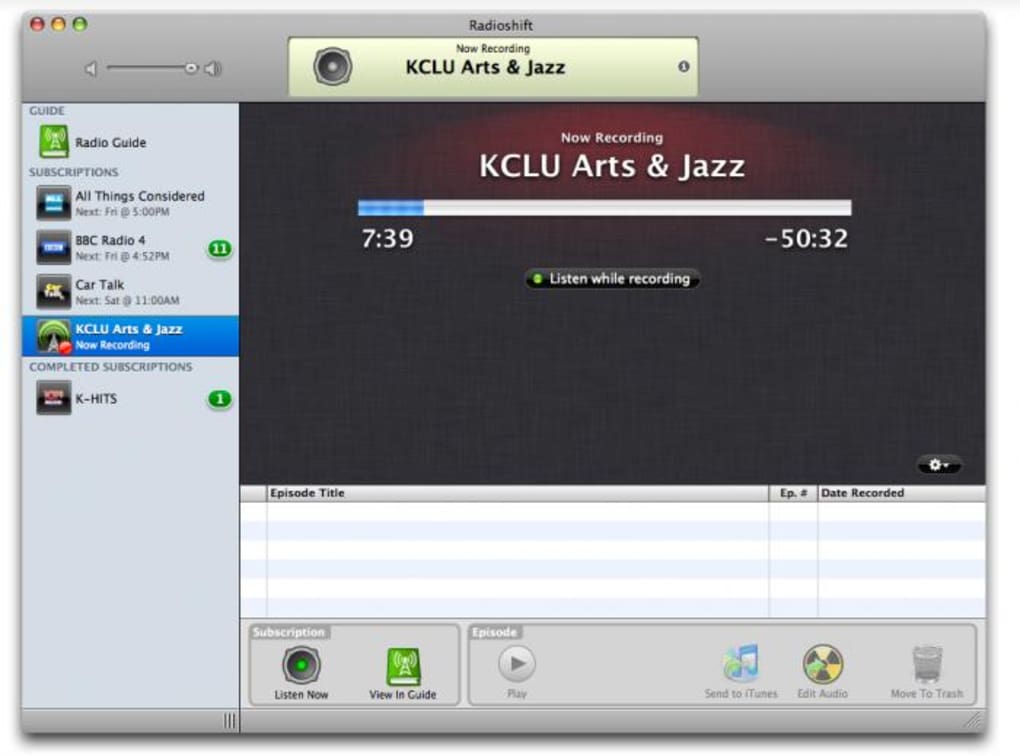
Radioshift is a desktop‑based radio and podcast aggregator that lets you explore, subscribe to, and listen to any station on the planet without ever leaving your computer. Its interface blends the visual familiarity of iTunes with the simplicity of a news reader, giving users a clean, column‑based layout where stations are organized into spoken, music, and sports categories. Whether you’re a casual listener hunting for the latest pop hits, a sports fanatic tracking live commentary, or a podcast aficionado seeking niche talk shows, Radioshift’s searchable database and interactive world map make discovery effortless.
The tool also supports favorites, popular shows, and a “+” button that instantly adds a station to your personal library on the left pane, allowing for quick access later. Although the editing capabilities are limited to basic metadata tweaks, the application includes a short introductory movie and a comprehensive help manual to get newcomers up to speed. Recent updates have improved stability across Mac OS X 10.6 and later, resolved encoding quirks for non‑ASCII characters, and aligned the branding with TuneIn’s latest look.
For anyone who lives for live audio streams, Radioshift provides a secure, free, and highly customizable environment that rivals web‑based players while keeping all content locally organized.
Key Features
- Global Station Database: Access thousands of Internet radio stations and podcasts from every continent, searchable by name, genre, or geographic location.
- Intuitive UI: A hybrid iTunes‑style layout with a left‑hand library, central station list, and right‑hand details pane for easy navigation.
- Map‑Based Browsing: Visual world map that lets you click on a region to reveal local stations, perfect for travelers and language learners.
- Favorites & Popular Shows: Save your go‑to stations with a single click and explore trending programs curated by the Radioshift community.
- One‑Click Subscription: The “+” button adds stations to your library instantly, updating the left‑hand list without leaving the player.
- Metadata Editing: Limited but useful editing of station titles, descriptions, and genre tags to keep your library tidy.
- Built‑In Help & Intro Video: New users can watch a short onboarding video and consult a searchable manual for quick setup.
- Stability Improvements: Recent patches fix “Unsupported URL” errors, resolve audio/x‑ms‑asf playlist handling, and ensure smooth operation with iTunes and Flip4Mac.
- Secure Free Download: Radioshift is distributed at no cost, with no hidden fees or adware, and updates are delivered securely through the official website.
Each of these features has been designed with the end‑user in mind. For example, the map‑based browsing eliminates the need to type long station URLs, while the favorites system means you’ll never have to hunt for a beloved show again. The application also respects system resources, running efficiently on modern Mac hardware without excessive CPU load, making it suitable for background listening while you work or study. Moreover, the seamless integration with the macOS audio stack ensures that output quality remains high, supporting both stereo and surround sound configurations when available. Together, these capabilities transform Radioshift from a simple radio player into a comprehensive audio hub that can replace multiple web tabs, streaming services, and separate podcast apps.
Installation, Usage & Compatibility
Step‑by‑Step Installation
1. Download the installer: Visit the official Radioshift website and click the “Download for macOS” button. The file is a signed .dmg package, ensuring a secure download free from malware.
2.
Mount the disk image: Double‑click the .dmg file; macOS will open a window showing the Radioshift app icon.
3. Copy to Applications: Drag the Radioshift icon into your Applications folder. This step grants the app appropriate permissions and makes it available from Launchpad.
4.
Launch and authorize: Open Radioshift from Applications. macOS may ask to confirm that you trust the developer; click “Open” to proceed.
5. Run the initial setup: The first launch presents an introductory movie and a short wizard that asks whether you’d like to import existing iTunes playlists or start fresh.
Getting Started with the Interface
Once the app is running, the main window divides into three sections. The left column displays your personal library where subscribed stations appear. The central pane lists all available stations based on the selected category (Spoken, Music, Sports) or your search query.
The right pane shows detailed information about the highlighted station, including logo, genre, and a brief description. To add a station, simply click the + button next to its name; the station instantly moves to your library. Use the search bar at the top to type keywords, or click the world map icon to browse by location.
The “Favorites” tab lets you pin the stations you listen to most often, while the “Popular” tab surfaces trending shows curated by the Radioshift community.
Operating System Requirements
Radioshift officially supports macOS 10.6 (Snow Leopard) and newer. The application has been tested on macOS Catalina, Big Sur, Monterey, and Ventura, and it runs smoothly on both Intel‑based Macs and Apple Silicon (M1/M2) thanks to Apple’s Rosetta 2 translation layer for legacy code. While there is currently no Windows or Linux version, many users employ the macOS app through virtualization tools like Parallels Desktop or VMware Fusion if they need cross‑platform access.
Updating the Software
Radioshift checks for updates automatically each time it launches. When a new version is available, a discreet notification appears in the upper‑right corner. Clicking the notification downloads the latest .dmg, which you install over the existing application, preserving your library and settings. For users who prefer manual control, the “Check for Updates” option resides under the “Radioshift” menu in the macOS menu bar.
Pros and Cons
Advantages
- Completely free with no hidden advertisements or subscription fees.
- Extensive global station catalog, including niche podcasts and regional broadcasters.
- User‑friendly interface that mimics familiar media players, reducing the learning curve.
- Map‑based browsing for quick geographic discovery.
- Robust favorites system and easy one‑click subscription.
- Regular stability patches and compatibility with modern macOS versions.
- Secure download from a signed developer certificate.
Drawbacks
- No native Windows or Linux client; macOS‑only limits cross‑platform usage.
- Metadata editing is basic; power users may miss advanced tagging options.
- Limited integration with external streaming services (e.g., Spotify, Apple Music).
- Occasional latency on slower internet connections when streaming high‑bitrate stations.
- Absence of built‑in recording or offline download features for podcasts.
Frequently Asked Questions
Is Radioshift really free, or are there hidden costs?
Radioshift is 100 % free to download and use. There are no subscription fees, no in‑app purchases, and no ad‑ware bundled with the installer. All updates are also provided at no charge.
Can I listen to radioshift on a Windows PC?
At the moment Radioshift is only released for macOS. Windows users can run it via a macOS virtual machine or consider alternative cross‑platform apps like TuneIn Desktop.
How does Radioshift handle station URLs that are no longer active?
If a station’s stream becomes unavailable, Radioshift marks it with an “Unsupported URL” warning and removes it from the active list after a few failed attempts. The app’s recent stability fixes have reduced false positives, ensuring that most working stations stay online.
Does Radioshift support audio formats like AAC, MP3, or OGG?
Yes. Radioshift relies on macOS’s built‑in audio codecs, so it can play common streaming formats such as MP3, AAC, and even less‑common ones like OGG or audio/x‑ms‑asf, thanks to recent updates that added proper playlist handling.
Can I import my existing iTunes playlists into Radioshift?
During the first‑time setup, Radioshift offers an option to import iTunes music libraries. While it doesn’t transfer the actual audio files, it can read station URLs stored in iTunes playlists, allowing you to continue listening without rebuilding your collection.
Conclusion & Call to Action
Radioshift stands out as a polished, free desktop solution for anyone who loves live radio, podcasts, or music streaming from around the globe. Its blend of a sleek iTunes‑style UI, map‑driven discovery, and a robust favorites system makes it a compelling alternative to browser‑based players that often suffer from cluttered tabs and intrusive ads. While the macOS‑only limitation may deter Windows enthusiasts, the app’s stability, secure download, and frequent updates compensate with a reliable listening experience. If you’re ready to replace multiple streaming tabs with a single, organized hub, click the button below to download Radioshift now and start curating your personal global radio station library.